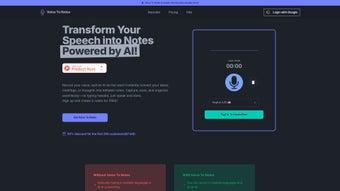

Download Voice To Notes – AI Voice‑to‑Text Transcription Tool
Overview
Voice To Notes is a cutting‑edge, web‑based AI transcription tool that turns spoken language into accurate, searchable text in real time. Designed for professionals who need reliable documentation—lawyers, doctors, teachers, journalists, and remote teams—the platform supports a wide range of dialects, accents, and noisy environments. By eliminating the need for manual typing, Voice To Notes boosts productivity, reduces errors, and makes note‑taking truly hands‑free.
The interface is clean and intuitive, allowing users of any technical skill level to start transcribing within seconds of opening the app. Export options include Word, PDF, and plain‑text files, making collaboration effortless across Windows, Mac, Android, and iOS devices. Whether you’re recording a courtroom testimony, a patient consultation, a university lecture, or a brainstorming session, Voice To Notes delivers fast, secure, and highly accurate transcripts that can be edited, shared, or archived instantly.
The service is offered as a free tier with essential features and a premium subscription that unlocks higher transcription limits, advanced speaker identification, and priority support. As a cloud‑based solution, it receives automatic updates, ensuring you always benefit from the latest AI models without the hassle of manual installations.
Core Features
- AI‑powered real‑time transcription with up to 98 % accuracy.
- Support for over 30 languages and regional accents.
- Noise‑cancellation algorithm that isolates speech from background sounds.
- Speaker separation and labeling for multi‑person meetings.
- Hands‑free operation via browser microphone or mobile device.
- Secure cloud storage with end‑to‑end encryption.
- One‑click export to DOCX, PDF, TXT, and Google Docs.
- Collaboration tools: share transcripts via link or embed in project management apps.
- Custom vocabulary import for industry‑specific terminology.
- Automatic timestamps and searchable keywords.
Each feature is built with a focus on reliability and user privacy. The AI engine continuously learns from a diverse dataset, allowing it to handle overlapping speech and heavy accents without sacrificing clarity. For regulated sectors such as legal and healthcare, Voice To Notes complies with GDPR and HIPAA standards, guaranteeing that sensitive information remains protected. The free tier includes 30 minutes of transcription per month, while the premium plan offers unlimited usage, priority processing, and dedicated API access for developers who want to embed the service into their own applications. Regular updates roll out automatically, meaning you never need to download a new version—just refresh your browser and the latest improvements are ready.
Installation & Usage Guide
Because Voice To Notes is a web‑based application, the installation process is remarkably simple. Follow these steps to start transcribing in under two minutes:
- Visit the official website. Open any modern browser (Chrome, Edge, Safari, or Firefox) and navigate to voicetonotes.com. The site automatically detects your operating system and offers the optimal settings for Windows, Mac, Android, or iOS.
- Create a free account. Click “Sign Up,” enter your email address, and set a secure password. You’ll receive a verification link; confirm it to activate your account.
- Allow microphone access. The first time you start a transcription, the browser will request permission to use your microphone. Grant access, and you’re ready to record.
- Select a language and dialect. Use the dropdown menu to choose the language of your audio. For best results, enable the “Accent Detection” toggle if you’re speaking with a regional variation.
- Start recording. Click the large red “Record” button. Speak naturally—there’s no need for a script. The AI will display the transcribed text in a scrolling pane as you talk.
- Edit and export. After recording, you can correct any errors directly in the editor, add comments, or highlight important sections. When satisfied, click “Export” and choose your preferred format.
- Save and share. Store the file in the cloud or download it locally. Use the built‑in sharing link to collaborate with teammates, or integrate the transcript with Google Drive, Dropbox, or Microsoft Teams via the “Connect Apps” menu.
For mobile users, the process mirrors the desktop experience. Simply download the Voice To Notes app from the Google Play Store or Apple App Store—both are free and secure. After installation, sign in with the same credentials, grant microphone permissions, and you can begin transcribing on the go. The app syncs with the cloud, so your transcripts are instantly available across all devices. If you encounter any issues, the “Help Center” provides step‑by‑step tutorials, video guides, and a live chat option for premium subscribers.
Compatibility, Pros & Cons, and Frequently Asked Questions
Compatibility
Voice To Notes runs on any device with a modern web browser, making it fully compatible with Windows 10/11, macOS Big Sur and later, Linux distributions, Android 8+ and iOS 13+. Because the service is cloud‑based, no additional software installation is required for desktop users. The mobile app is optimized for both Android and iOS, supporting tablets and smartphones alike. All data transfers are encrypted using TLS 1.3, ensuring a secure connection regardless of platform.
Pros & Cons
- Pros
- High accuracy across multiple languages and accents.
- Real‑time transcription eliminates post‑meeting typing.
- Robust noise‑cancellation works in bustling environments.
- Free tier available; premium plan offers unlimited usage.
- Secure cloud storage with GDPR and HIPAA compliance.
- Seamless export to popular document formats.
- Cross‑platform support (Windows, Mac, Android, iOS).
- Automatic updates mean you always have the latest AI model.
- Cons
- Requires a stable internet connection; offline mode is not yet available.
- Free tier limited to 30 minutes per month, which may be insufficient for heavy users.
- Speaker identification may need manual correction in large groups.
- Advanced custom vocabulary feature is only in the premium plan.
FAQ
Is Voice To Notes truly free to use?
Yes, the platform offers a free tier that includes 30 minutes of transcription each month, unlimited access to the web interface, and basic export options. For users who need more minutes or advanced features, a paid subscription is available.
How secure is my data when I upload audio?
Voice To Notes uses end‑to‑end encryption (TLS 1.3) for all data in transit and stores transcripts in encrypted cloud storage. The service complies with GDPR and HIPAA, ensuring that personal and medical information is handled securely.
Can I use Voice To Notes offline?
Currently, the application requires an internet connection because the AI processing runs on secure servers. An offline mode is planned for a future release.
What languages does the tool support?
Voice To Notes supports over 30 languages, including English, Spanish, Mandarin, French, German, Arabic, Hindi, and many regional dialects. Users can also add custom vocabularies to improve industry‑specific terminology.
How do I export my transcripts?
After a transcription is complete, click the “Export” button and choose from DOCX, PDF, TXT, or direct integration with Google Docs. You can also generate a shareable link that grants view‑only or edit permissions.
Voice To Notes delivers a remarkably accurate and fast transcription experience across a variety of professional scenarios. Its AI engine handles noisy environments and multiple speakers with ease, and the web‑based approach eliminates the need for cumbersome installations. While the free tier’s minute limit may be restrictive for power users, the premium plan is competitively priced and adds valuable features like custom vocabularies and priority processing. Overall, it’s a secure, versatile, and user‑friendly solution that enhances productivity for anyone who regularly works with spoken content.
Conclusion & Call to Action
In a world where remote collaboration and digital documentation are the norm, Voice To Notes stands out as a reliable, AI‑driven transcription companion. Its blend of high accuracy, multi‑language support, and seamless integration with everyday productivity tools makes it a must‑have for legal professionals, healthcare providers, educators, and anyone who values efficient note‑taking. The free tier lets new users explore the core capabilities without risk, while the premium subscription unlocks the full power of speaker separation, unlimited minutes, and advanced security features. Because the service updates automatically, you can focus on capturing ideas rather than managing software patches.
Ready to transform how you capture spoken information? Download Voice To Notes today, create your free account, and experience hands‑free transcription that’s both fast and secure. Boost your productivity, improve accessibility, and keep your records flawless—one voice at a time.



.png)



